A security control room is where cameras, alarms and access events turn into decisions. If it is designed well, operators see what matters, respond quickly and stay alert through long shifts. If it is designed poorly, they miss events on crowded screens, suffer from glare and fatigue, and depend on systems that fail without warning. This guide covers the main decisions when you plan a control room and video wall for an office tower, hotel, industrial site or multi-site business in the UAE.
Start with what the room must do
Before choosing screens or furniture, define the operation. Answer a few questions in writing:
- How many cameras, alarm points and access doors will be monitored, today and in five years?
- Is the room staffed 24 hours, during working hours only, or used mainly for investigation?
- How many operators work per shift, and is there a supervisor position?
- Which events need immediate action, and who do operators call?
- Does the room also serve as an emergency or crisis management space?
These answers drive everything else: the number of workstations, the size of the video wall, software licences, network capacity and the room's footprint.
Room layout and operator ergonomics
Operators spend hours looking at screens, so the layout should be built around their sightlines and comfort.
Sightlines and distances
Each operator should see the full video wall without turning their head sharply, and also read their own desk monitors comfortably. Curved or angled console layouts help. The viewing distance to the wall depends on screen size and resolution: the further away the operators sit, the larger the image needs to be to read details such as faces or number plates.
Consoles, lighting and acoustics
Purpose-built control room consoles keep monitors at the right height and hide cabling and computers. Lighting should be indirect and dimmable, with no reflections on screens. Avoid windows behind the video wall. Acoustic panels and carpet reduce noise when several operators talk on radios and phones at the same time.
Environment
Plan cooling for the heat produced by screens and computers, comfortable chairs designed for 24/7 use, and space for a supervisor to see all positions. Keep servers and recorders in a separate, cooled equipment room rather than inside the operator space.
Choosing a video management system (VMS) and alarm workflow
The VMS is the core of the control room. It connects cameras, recorders and other systems, and decides how video appears on operator screens and on the wall. When comparing platforms, look at:
- Support for the camera brands you already have or plan to buy, such as Hikvision, Axis Communications, Samsung or Bosch, through native drivers or ONVIF.
- Video wall management, so operators can push cameras or layouts to the wall with a click.
- Alarm management with priorities, procedures and event logging.
- Integration with access control, intrusion and fire alarm panels.
- Multi-site support if you monitor several branches from one room.
- User permissions and audit trails that record who viewed or exported footage.
Sizing the video wall
A video wall is not just a large screen. Its size and configuration should follow the operation.
- Content: decide what the wall shows. Usually it is a mix of priority cameras, alarm pop-ups, maps and dashboards, not every camera at once.
- Screen technology: narrow-bezel LCD panels are common for security walls. Direct-view LED is an option for larger walls without visible seams, but pixel pitch must suit the viewing distance.
- Layout: the number of rows and columns depends on wall dimensions, ceiling height and the operators' line of sight. Avoid placing panels so high that operators strain their necks.
- Controller: a video wall controller or VMS decoders handle how streams are split across panels. Make sure it can decode the number and resolution of streams you need.
- Duty cycle: choose displays rated for continuous operation if the room runs around the clock.
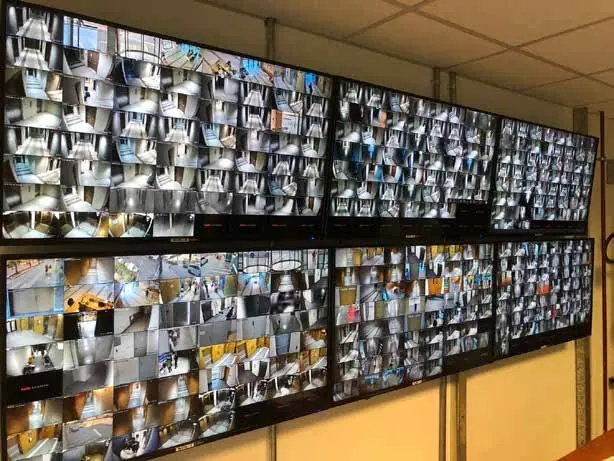
A common mistake is filling the wall with dozens of small tiles. Operators cannot watch them all. A smaller number of meaningful views, with alarms brought forward automatically, works better.
Alarm handling workflow
Technology helps, but procedures decide whether an event is handled correctly. A clear workflow usually follows these steps:
- Detect: an alarm arrives from a camera analytic, intrusion sensor, door or fire panel.
- Verify: the VMS shows the linked camera and recorded clip so the operator can confirm what happened.
- Respond: the operator follows a written procedure on screen, such as dispatching a guard or calling emergency services.
- Record: actions and comments are logged with the alarm for later review.
- Review: supervisors analyse false alarms and response times to improve settings and procedures.
Redundancy and remote access
A control room should not stop because one device fails. Consider redundant recording servers or failover, RAID storage, UPS for screens and workstations, and dual network paths for critical links. A well-designed network and structured cabling with fibre backbones make a large difference to reliability.
Remote access lets managers view live video and alarms from a laptop or phone. Set it up securely: use encrypted connections or VPN, strong passwords with multi-factor login where supported, separate user roles, and keep firmware and software updated. Avoid exposing recorders directly to the internet.
Training and handover
Even the best system will be underused if operators do not know it well. Training should cover daily tasks such as searching and exporting footage, handling alarms, controlling the wall and reporting faults. Supervisors also need to manage users and review logs. Provide written procedures and as-built documentation at handover, and plan refresher sessions when staff change.
Frequently asked questions
Can I upgrade an existing CCTV room into a full control room?
Often yes. Existing cameras can usually be kept if they are compatible with the new VMS. The upgrade typically focuses on the software, video wall, consoles and network.
What determines the cost of a control room?
The main factors are the number of cameras and systems integrated, VMS licences, the size and type of video wall, consoles and room works, redundancy level and the amount of cabling required.
Design your control room with maxclick
maxclick plans and builds command and control rooms in the UAE, from VMS selection and video walls to consoles, cabling and operator training. See our command and control room services, or contact us to arrange a site visit and get a fixed written quote.