
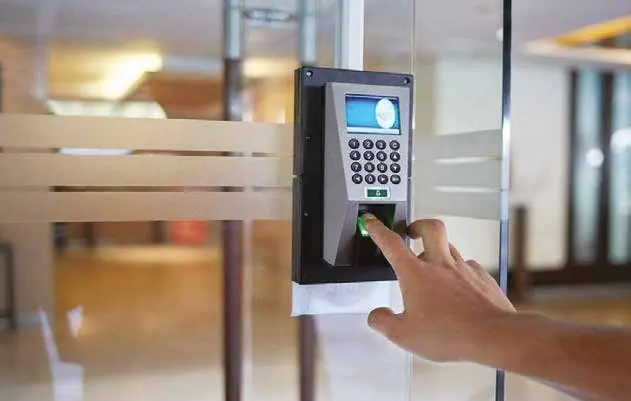
Keys get copied, lost and passed around. An access control system replaces them with cards, PIN codes, fingerprints or face recognition, and gives you a clear record of who entered which door and when. We start by looking at your doors, your team and your daily routines, then design a system that keeps sensitive areas restricted while letting staff and visitors move through the building without fuss.
The same readers can record attendance. Staff clock in and out at the entrance, and the software produces timesheets you can export to payroll. We install devices from brands such as ZKTeco and Hikvision, fit the correct locks for each door, set up user groups and schedules, and train your HR or admin team to add, remove and report on users themselves.
What is included
- 01Door survey and access plan
- 02Card, PIN, fingerprint and face readers
- 03Electric locks, exit buttons and door sensors
- 04Time attendance software and payroll exports
- 05User groups, schedules and visitor access
- 06Training, documentation and maintenance
How we set up access control
We start with a door-by-door survey. For each door we note its material, how it opens, how often it is used and who should pass through it. Server rooms, stores and finance offices usually need tighter control than a main reception. From this we build a simple access plan that shows which groups can open which doors and at what times.
- We choose the right lock for each door type, glass, wood or metal.
- We link doors to the fire alarm where needed, so they release in an emergency.
- We set up the software so your team can manage users without calling us.
For attendance, we agree your shift rules, grace periods and overtime policy before setup, so reports match how your HR team already works. Exports can be shaped to fit your payroll process, which saves manual work at the end of each month.
Readers, locks and attendance, explained simply
- Cards and fobs: fast and familiar. Lost cards can be cancelled in seconds.
- Fingerprint: no card to carry and hard to share, which helps prevent buddy punching in attendance.
- Face recognition: touch-free and quick at busy entrances.
- Magnetic locks and electric strikes: magnetic locks hold a door closed with power. Electric strikes release the latch. We choose fail-safe or fail-secure behaviour to suit each door.
- Attendance software: it turns clock-in records into shifts, overtime and absence reports for HR.
Our article on access control and time attendance in the UAE compares these options in more depth.
Why it matters for UAE workplaces
Many UAE businesses run multiple shifts, use contract staff or operate across several sites. A central system lets you manage all of them from one place and see attendance in real time. Outdoor readers at gates and car parks face heat, dust and direct sun, so we use weather-rated devices and shade them where possible.
Biometric data is personal information, so we set up access rights carefully and limit who can view or export records. Access control also works well alongside a video intercom at the main entrance, so visitors can be seen and let in remotely.
Ideal for
- Offices and corporate headquarters
- Factories and warehouses
- Schools and training centres
- Clinics and healthcare facilities
- Residential buildings and gated villas
From our projects
Brands we work with
Questions about this service
What is the best time attendance system for a company in the UAE?
The best time attendance system depends on your workforce and sites. Fingerprint terminals suit most offices, face recognition is faster and touch-free, and card or mobile options suit sites where biometrics are impractical. Look for software that handles shifts, overtime and leave, and exports reports to your payroll. maxclick installs time attendance systems from brands such as ZKTeco and configures them to your working rules.
Fingerprint or face recognition: which is better for attendance?
Face recognition is usually better for busy sites because it is touch-free, fast and not affected by dirty, dry or worn fingerprints, which is common in workshops and construction. Fingerprint terminals are reliable and widely used in offices. Many modern terminals support both, plus cards or PIN codes as backup. maxclick helps you choose based on staff numbers, work environment and hygiene needs.
What is an access control system and how does it work?
An access control system decides who can open which door and when. Users identify themselves with a card, fingerprint, face, PIN or phone at a reader, the controller checks their permissions and releases an electric lock if access is allowed. Every entry is logged, and permissions can be changed or cancelled instantly. maxclick installs access control for offices, warehouses, server rooms and residential buildings.
Can a time attendance system connect to payroll software?
Yes. Most time attendance systems export attendance data, including hours worked, late arrivals, overtime and absences, in formats that payroll or HR software can import, and some integrate directly. The exact method depends on the attendance software and your payroll system. Setting this up correctly reduces manual calculations and disputes. maxclick configures the reports and export format to match your payroll process.
What happens to access control doors during a power cut or fire?
Access control systems are normally fitted with backup batteries so doors keep working during short power cuts. Doors on escape routes are usually set to unlock automatically when the fire alarm activates, and an emergency break-glass release is installed beside them so people can always exit. The exact behaviour must follow fire safety requirements for your building. maxclick designs door hardware and wiring with these safety rules in mind.